Hour Of Day Optimization
The point of “Hourly Day Parting” is to identify the best performing hours of the day and improve your campaign performance. (Which is usually CPA and Conversions. But can be used to improve CTR, clicks and impressions, impression share, and even bounce rates)
STEP 1. Using the google REPORTS tab. Graph Conversions and Cost against Hour of Day. This way you can quickly identify specific hours of the day where cost shoot up and sales go down. (You can also pull excel reports on Conversions and Cost and then segment the data by Hours.) (See Below)
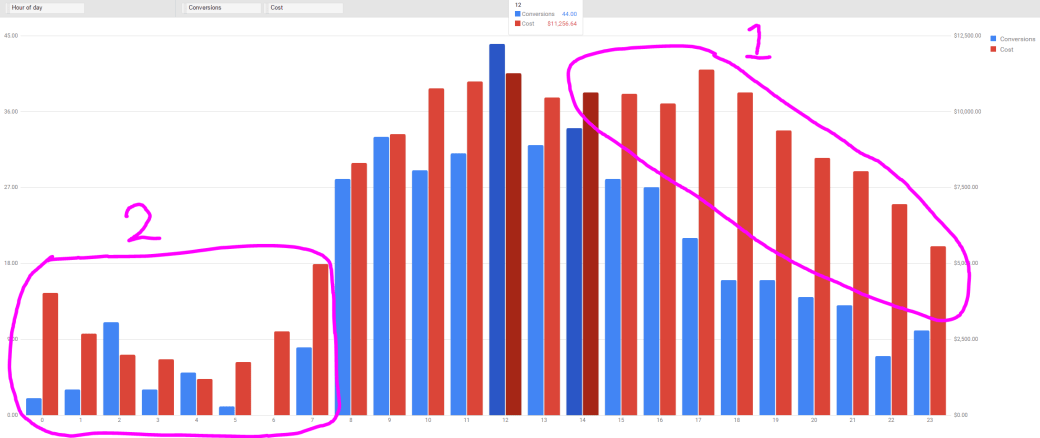
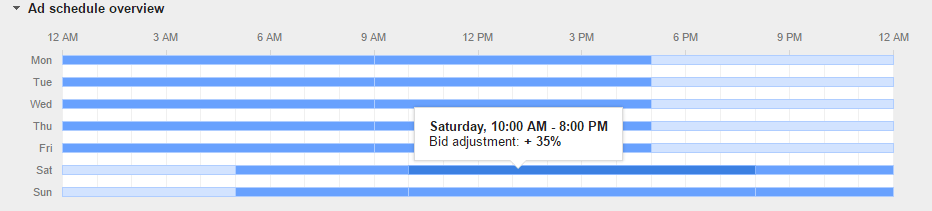
STEP 2. Decide if whether if you want to STOP completely during those hours or simply lower the bid. Sometimes lowering bids can help you achieve profitability during those bad performing hours by limiting your visibility and ad rank during those hours. If all else fails, as a last resort, you can then completely pause the campaign during your worst hours. (See Below)
STEP 3. IF you look at the graph and the circle #2. You’ll see during late night hours performance vary sharply. To deal with this you can add the Total Conversions and divided by Total Cost during those hours. You can then look at the average CPA and decide if the overall CPA is above or below your goal.
STEP 4. Repeat this on a campaign by campaign bases after you set Hourly Day Parting to further optimize. Just keep in mind the more campaigns the more you have, the more work you have. manually optimizing hourly day parting data is a time consuming task.
SEPT 5. You may also want to separately look at weekend and weekday data. As most traffic behave very differently on weekends.
 Paid Search School